

Microsoft 365 Security Assessment

Identify security gaps in your Microsoft Cloud environment and get a clear roadmap for reducing risk.

image

When Microsoft 365 Security Starts to Feel Uncertain

You’re running Microsoft 365. But you don’t know how secure it is.

icon

No clear view of your Microsoft 365 security posture

icon

Configurations are missing, incomplete, or misaligned

icon

Overly permissive access is exposing users and data

icon

Built-in Microsoft 365 security features are not in place

icon

No prioritization of what to fix or how to reduce risk


Microsoft 365 Security Assessment

Is your Microsoft 365 environment leaving you exposed?

ProArch’s Microsoft 365 Security Assessment evaluates your Microsoft 365 environment across 29 critical security controls to uncover gaps before attackers do.

In three weeks, you’ll walk away with a prioritized roadmap, customized to your budget and business risk, so you can secure what matters most.

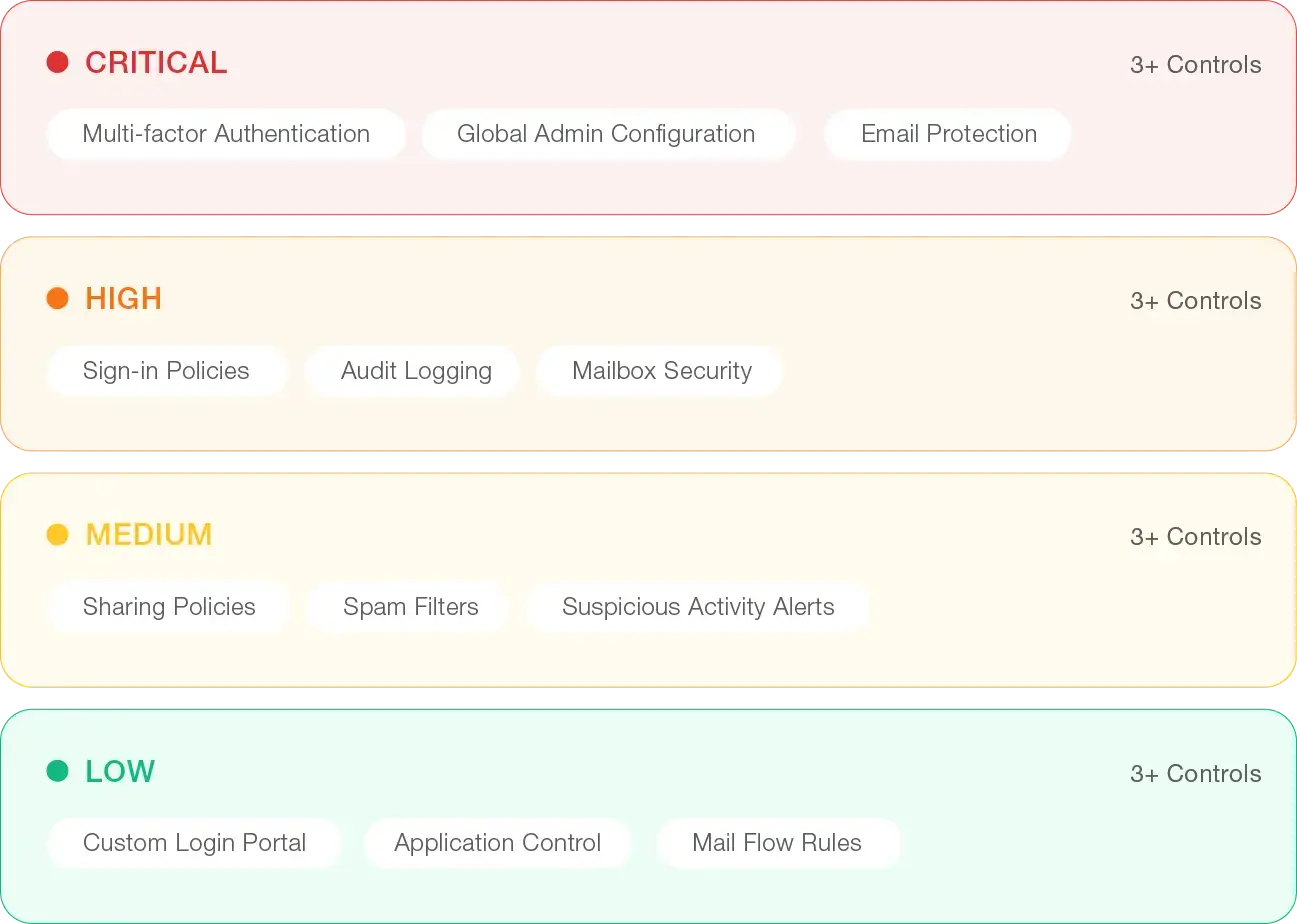
29 Controls • Categorized By Imapact
image
 

What we Evaluate

A Complete View of Your Microsoft 365 Security

Get a clear, prioritized view through an M365 security assessment or focus deeper on specific workloads and risks unique to your environment.

 
icon

Identity & Access Controls

MFA | Conditional Access | Admin Roles

icon

Email Security & Threat Protection

Defender | Phishing | Spam

icon

Monitoring & Alerting

Audit Logs | Suspicious Activity Alerts

icon

Sharing & Collaboration Controls

External Access | Permissions

icon

Core Tenant Configuration

Authentication | DNS | App Permissions

Our Process

How the Microsoft 365 Security Assessment Works

Step 01

Environment Analysis

Your Microsoft 365 tenant is evaluated against 29 critical controls using our “do-first” security priorities, Microsoft Secure Score, and Industry best practices.

 
Step 02

Risk Impact Prioritization

Every control is categorized by risk level—Critical, High, Medium, or Low—to help you act on what matters most, first.


Step 03

Hardening Plan

You’ll receive a detailed report with misconfigurations and security gaps, remediation steps, and expected impact of each change impact.


Step 04

Implementation Options

As a follow-on engagement, we will implement the Microsoft 365 security recommendations.


what you get

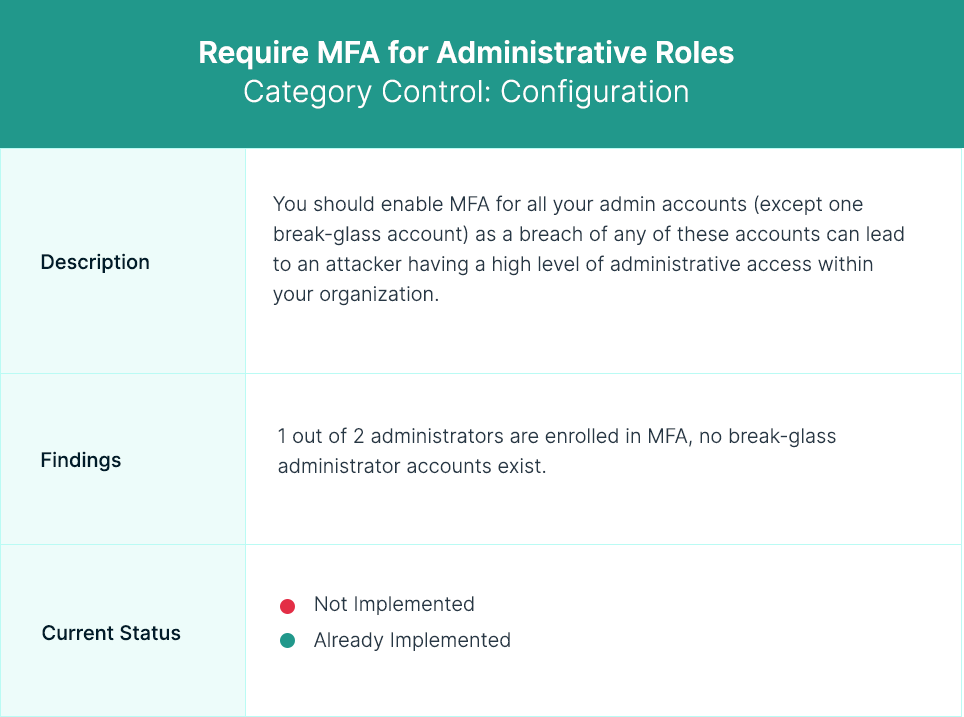
Microsoft 365 Security Assessment Sample Report
image

Risk Impact Level

We categorize each control by risk level, so you know what needs attention first.


Findings

Unique details for each control are included to assist with remediation.


Current Status

States whether the control is or is not already implemented.


Security Gaps we Uncover Most

Where Microsoft 365 Environments Are Most Often Exposed

icon

MFA not fully enforced


icon

Conditional Access gaps and misconfigurations


icon

Too many or poorly managed admin roles


icon

Gaps in filtering, forwarding controls, or Defender policies


icon

Inactive or unmanaged accounts


icon

Risk alerts are generated, but not triaged or acted on


icon

Legacy authentication still enabled


icon

External sharing, inherited permissions, and anonymous access

Benefits of M365 Security Assessment

A Faster Path to Better Security

Actionable next steps so your team knows where to focus first

Recommendations prioritized by real risk, not just Secure Score

Align to Microsoft best practices and Zero Trust principles

Tailored to tools and areas that matter most to you

Maximize the value of your Microsoft investment

Why ProArch

The Right Partner for Microsoft 365 Security

  • Microsoft Solutions Partner for Security with specializations
  • Member of the exclusive Microsoft Intelligent Security Association (MISA)
  • Deep expertise across the full Microsoft security stack
  • We can help you implement the right controls after the assessment

image


Ready to Close Gaps in Your Microsoft 365 Security?

Frequently Asked Questions

What is a Microsoft 365 Security Assessment?

It’s a structured evaluation of your Microsoft 365 environment against security best practices. The result: a clear snapshot of your current state and a plan to fix misconfigurations, reduce risk, and harden your defenses.

When should you run a Microsoft 365 Security Assessment?

You should run a Microsoft 365 Security Assessment if you suspect misconfigurations, are preparing for audits or compliance requirements, or want to ensure you’re fully using the security features included in your environment.

What security controls are covered?

The security controls reviewed as part of the Microsoft 365 Security Risk Assessment are a combination of ProArch’s do-first controls, Microsoft 365 Security Best Practices, and industry-standard best practices.

We evaluate identity, access, email, configuration, and behavioral security controls, including:

  • Multi-Factor Authentication (MFA)
  • Global Admin Configuration
  • Mailbox Security
  • Audit Logging
  • Suspicious Sign-In Alerts
  • Application Permissions
  • Mail Flow Rules
  • …and more.

What is the final deliverable?

A 10+ page report outlining:

  • Your current security posture
  • Misconfiguration and risk findings
  • Prioritized remediation actions

We’ll walk you through the findings so you know exactly where to focus.

How is it different from Secure Score?

Secure Score is an automated Microsoft tool that provides a list of recommended security improvements and a numerical score based on best practices.

ProArch’s M365 Security Assessment has security experts validate your configurations, identify real misconfigurations, and prioritize findings by real risk so you know exactly what to fix and in what order, not just how to improve a score.

Do you provide implementation support?

Yes. In a separate Microsoft 365 security consulting engagement we can implement all or some of the recommendations from the Microsoft 365 Security Assessment.

Is the Microsoft 365 Security Assessment customizable?

Yes. Depending on your organization’s requirements, ProArch can incorporate or go deeper on specific areas to assess that may not be covered under our standard assessment criteria.

How much does the Microsoft 365 Security Assessment cost?

The Microsoft 365 Security Review typically takes 2-3 weeks and starts at $6,000. Final cost depends on scope and environment complexity.

Is this the same as an Office 365 security audit?

A Microsoft 365 Security Review is similar to an Office 365 security audit, but it goes further. While an audit typically focuses on identifying gaps or compliance issues, the review includes expert validation of your configurations, prioritizes findings based on real risk, and provides a clear, actionable plan to improve your security posture.