
By: Debojyoti Goswami
Security Analyst II, Security and Compliance, Delivery
ProArch SOC identified a password credential theft campaign using emails from trusted external business partners.
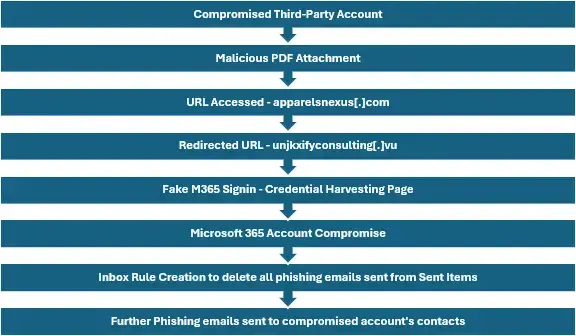
It starts with emails containing a malicious PDF attachment named “gr5-ugrr8-g.pdf.pdf” that redirected users through systems controlled by the attacker to a credential harvesting page.
Successful user interaction results in account compromise, suspicious sign-in activity, and unauthorized mailbox rule creation.
How Do Trusted-Account Phishing Attacks Work?
- Investigation identified phishing emails originating from legitimate external accounts associated with known and trusted third-party organizations.
- Historical email communications were observed between affected users and few of the originating organizations, suggesting the threat of actors leveraged compromised third-party accounts rather than spoofed domains.
Attack Flow
What Are the Warning Signs of This Phishing Campaign?
- Attachment name contains : gr5-ugrr8-g.pdf.pdf
- Malicious Domains
- apparelsnexus[.]com
- cornerstarnamibia[.]com
- unjkxifyconsulting[.]vu
- Malicious IP Address: 250.26[.]201
- Suspicious Authentication Sources: 250.126[.]81 , 2a13:9244::xx
What Happens After an Account Is Compromised?
- Successful sign-ins from previously unseen infrastructure.
- Multiple users exhibiting similar authentication patterns.
- Creation of mailbox rules are designed to hide attacker communications.
- Auto-delete and message-hiding rules target specific email senders or domains.
- Internal forwarding of phishing emails observed in some cases, increasing exposure
Why Are Trusted-Account Phishing Attacks Dangerous?
Because the emails originate from legitimate accounts and known business contacts, users are significantly more likely to trust the message and interact with attachments.
Successful compromise can lead to unauthorized Microsoft 365 access, mailbox manipulation, business email compromise (BEC), data exposure, and additional phishing activity targeting internal and external contacts.
How Can You Respond to a Trusted-Account Phishing Attack?
- Investigate any user who received or interacted with the attachment name containing “gr5-ugrr8-g.pdf.pdf”.
- Review sign-in logs for activity originating from 209.250.126[.]81 and associated 2a13:9244 IP ranges.
- Hunt for connections to apparelsnexus[.]com, cornerstarnamibia[.]com ,unjkxifyconsulting[.]vu, and 195.250.26[.]201 across endpoints, proxy logs, firewall logs, and DNS records.
- Review Exchange Online mailbox rules for unauthorized actions such as Delete Message, Move to RSS Feeds, Archive, or Forward Externally.
- Reset passwords and revoke active sessions for impacted users.
- Block identified URLs, IP addresses, attachment hashes, and malicious domains where appropriate.
- Reinforce user awareness regarding unexpected PDF attachments, even when received from known business contacts.
- Monitor for additional phishing activity originating from trusted third-party organizations.
How Can Organizations Reduce the Risk of Trusted-Account Phishing?
The activity is consistent with a Business Relationship Compromise (BRC) campaign in which threat actors leveraged compromised third-party accounts to distribute PDF-based credential harvesting lures.
The campaign relied on trusted sender reputation rather than malware delivery, highlighting the importance of identity monitoring, mailbox auditing, and user vigilance when interacting with attachments received from established business relationships.
How Can ProArch SOC Help Protect Your Organization?
Trusted account phishing can blend into normal business communication and go unnoticed by busy internal teams. Continuous monitoring across your network, infrastructure, systems, identities, and endpoints can help detect suspicious activity sooner.
Microsoft security solutions provide a strong foundation for phishing prevention and response, while ProArch SOC helps configure, monitor, and manage those controls around the clock. Strengthen your Microsoft security environment and respond faster to hidden threats. Talk to ProArch experts.