
By: Kamaljeet Kaur
Security Analyst, Security and Compliance, Delivery
Observation Summary
A new Microsoft Teams feature surrounding guest-access has begun rolling out to tenants and could allow attackers to bypass your Microsoft Defender protections by shifting users into insecure external tenants. This creates a unique stealth attack path for phishing, malware, and identity compromise.
ProArch proactively identifies these blind spots to protect clients from emerging cross-tenant threats, but it is worth noting that this unique attack relies on security teams to proactively enforce security from the start.
It is imperative you have security experts hardening your Microsoft 365 tenants and staying up to date with the latest Microsoft feature releases to ensure no unattended risk is introduced!
What’s Happening
Attackers are exploiting a core architectural behavior in Microsoft Teams:
1. How the Exploit Works
- When a user is added as a guest to another organization’s tenant, they temporarily operate under the host tenant’s security posture.
- Threat protection from Microsoft Defender for Office 365, Safe Links, Safe Attachments, and anti-phishing policies do not apply unless they are configured within the host organization’s tenant where the user was invited to.
- This enables attackers to:
- Create low-security Microsoft 365 tenants
- Invite targeted users as guests to an insecure tenant with downgraded security
- Deliver malicious content bypassing your organization’s Microsoft 365 Security controls (e.g., Defender for Office 365).
- Execute phishing, malware distribution, and social engineering attacks that may go undetected.
2. Why This Works
- Teams guest access was designed for collaboration, not adversarial abuse.
- Cross-tenant communication does not inherit the user’s home organizations:
- Defender policies
- Conditional Access
- Safe Links / Safe Attachments
- DLP (Data Loss Prevention)
- Anti-phishing rules
- Attackers exploit this trust gap to bypass secure environments simply by shifting users into an insecure one.
3. Emerging Attacker Techniques
Threat intel shows rapid adoption of this technique in the wild:
- Tenant Spoofing: Attackers register convincing tenant names to appear legitimate.
- Payload Delivery via Chat: Malicious URLs sent in guest tenant chats bypass Safe Links.
- Malware via File Sharing: Insecure tenants allow unsafe or unsigned files.
- Identity Pivoting: Once trust is established, attackers socially engineer further internal access.
This turns Microsoft Teams into a cross-tenant attack delivery system, without breaching the victim’s actual environment.
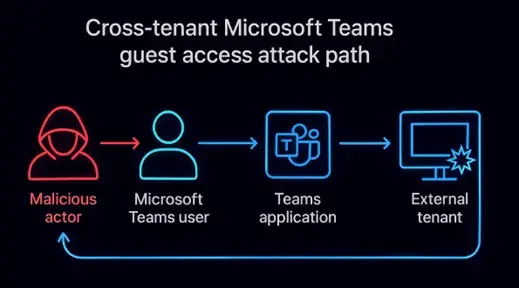
Figure 1: Attack Path — How adversaries exploit Microsoft Teams guest access to bypass Defender protections and deliver silent, cross-tenant threats.
Why It Matters:
Threat actors are now systematically weaponizing low-security and unmanaged tenants to target high-value organizations, making this not just a theoretical weakness but an active exploitation vector.
Technical Risks
- Bypass of Security Controls: Defender for Office 365 protections do not activate under guest context.
- Stealth Payload Delivery: Malicious links/files appear legitimate because filtering is absent.
- Credential Harvesting: Chat-based phishing increases successful MFA bypass attempts.
- Tenant-to-Tenant Pivoting: Attackers can escalate from guest chat to identity compromise (OAuth abuse, token theft).
- Loss of audit fidelity: Guest-tenant actions generate fragmented logs that hinder incident reconstruction.
Business / Operational Risks
- High-risk industries (healthcare, manufacturing, technology services) face increased exposure due to heavy multi-tenant collaboration.
- Regulatory non-compliance if sensitive data is shared or compromised outside protected boundaries.
- Reputational damage and operational downtime from compromised employee accounts.
- Supply-chain security impact: Vendors and partners become indirect breach points.
Bottom Line:
Attackers are manipulating trust boundaries. The moment users cross into another tenant, they operate outside your defenses, and attackers are using that blind spot to strike.
Recommendations
1. Harden Microsoft 365 Tenant & External Collaboration
- Require approval workflows for any new external domain collaboration, ensuring that only vetted and trusted organizations can establish cross-tenant access.
- Implement admin-approved inbound guest invitations in Entra ID to block users from accepting invites from untrusted or attacker-controlled tenants.
- Restrict or disable unsolicited guest access where possible.
- Allow guest access only to approved external domains.
- Enforce Conditional Access policies specifically for external tenant interactions.
- Apply session controls (via Defender for Cloud Apps) to limit risky actions within external tenants.
2. Strengthen Identity & Access Controls
- Require phishing-resistant MFA (FIDO2 keys, number matching).
- Enforce Just-in-Time (JIT) access with Entra ID PIM for external collaboration apps.
- Review guest accounts and remove stale or unused identities.
3. Improve Visibility & Detection
- Enable monitoring for:
- New guest invitations
- External tenant activity
- File-sharing events
- Unknown-domain interactions
- Ingest Teams logs into Microsoft Sentinel for correlation with identity and endpoint telemetry.
4. Deploy Threat Hunting & Managed Detection & Response (MDR) Coverage
ProArch’s MDR team provides:
- Continuous monitoring of your Entra ID identities and guest-access anomalies
- Custom Sentinel detection rules to alert on tenant spoofing and cross-tenant phishing
- Rapid containment via Conditional Access enforcement, identity isolation, and session revocation
5. Educate Users on External Tenant Risks
- Train employees that external Teams chats may lack normal protection.
- Encourage verification of unexpected guest invitations or tenant switches.
ProArch supports organizations with rapid risk assessments, tenant hardening, detection engineering, and 24/7 SOC services to defend against evolving identity, collaboration, and cloud-based attack paths.
If you are concerned if you are at risk to these attacks, reach out to our team for a Microsoft 365 Security Review or to discuss our Managed Security Services.